Call 1 (425) 406-1174 to start a Data Recovery!
MacBook Data Recovery
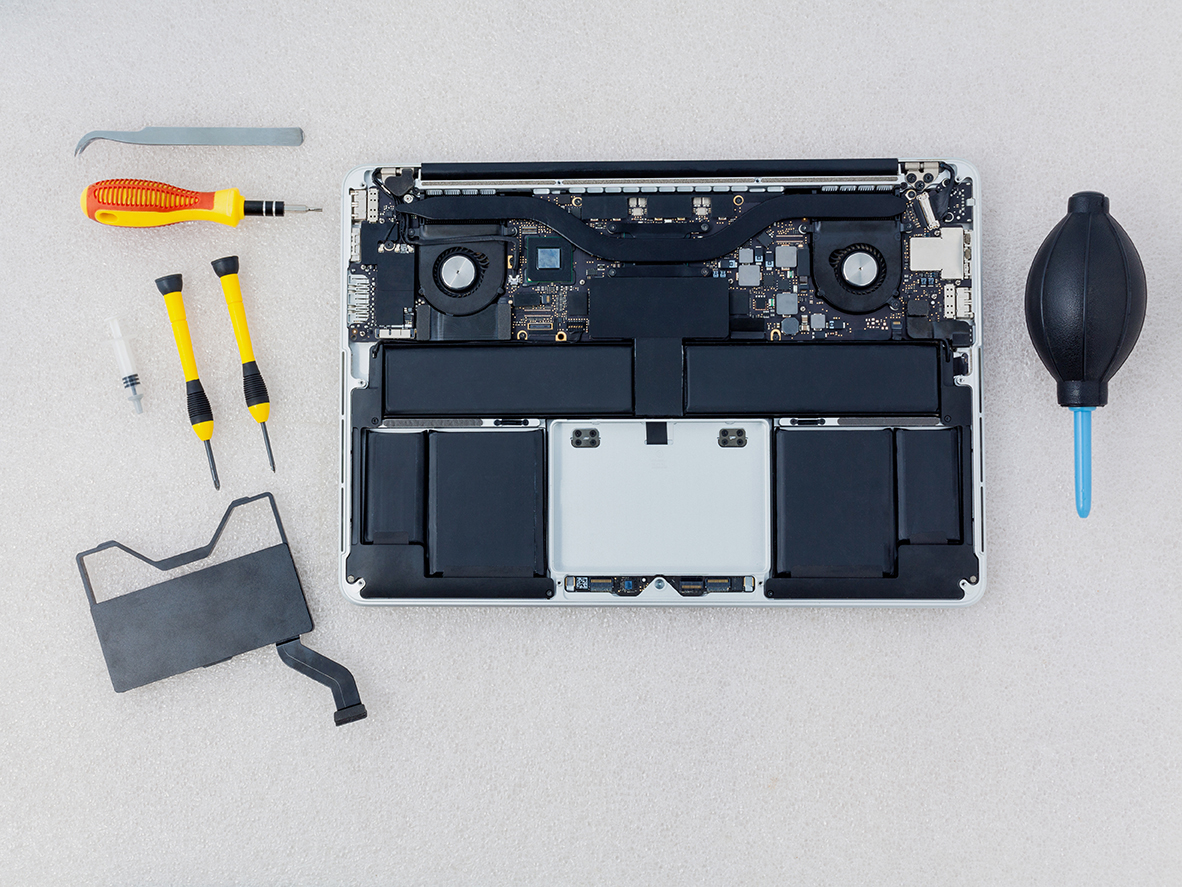
- Soldered Storage: On modern Apple Silicon models (M1, M2, M3, and newer), NAND flash memory is soldered directly to the logic board rather than existing as a removable card.
- Hardware-Bound Encryption: Data is encrypted via a key generated inside the Apple processor, making traditional "chip-off" desoldering methods ineffective because separating the NAND chips from the factory-paired CPU permanently scrambles the data.
- Micro-Soldering & Repair: Restoring shorted power rails or damaged components under high-magnification microscopes.
- Firmware and Controller Handling: Bypassing communication failures and stabilizing the data translation layers.
- APFS Extraction: Utilizing specialized equipment to image the Apple File System once the hardware and cryptographic handshake are restored.
- Liquid Damage: Motherboard short circuits from spills.
- No Power / Dead Device: Failures in the USB-C controller or power management IC.
- Boot Loops & OS Corruption: Systems freezing during updates.
- Logical Issues: Accidental file deletion and volume corruption.

- Details
- Written by: Seattle Data Recovery
- Category: Macbook Pro Data Recovery
The Mac Pro Tower Legacy and Data Recovery Challenges
Since its inception, the Mac Pro tower has been a cornerstone of professional computing, prized for its power and expandability. However, with great hardware comes complex data management, and when unforeseen data loss strikes, specialized recovery skills become paramount. Seattle Data Recovery stands at the forefront of restoring lost files from these iconic machines, seamlessly bridging generations of technology.
Data recovery from Mac Pro towers is not a one-size-fits-all task. The evolution from Intel-based units (2006-2012) to the latest Apple Silicon Mac Pro (2023) has introduced distinct storage architectures, each with its own intricacies. Consequently, Seattle Data Recovery approaches each case with tailored expertise to maximize the success of file retrieval.
Understanding the Intel-Based Mac Pro Tower Storage Architecture
The classic Intel Mac Pro towers, produced between 2006 and 2012, feature a straightforward and accessible storage design. These systems housed four standard 3.5-inch drive bays accommodating conventional SATA hard drives (HDDs). Additionally, users can adapt 2.5-inch SATA SSDs using specialized sleds or adapters, which are common among enthusiasts seeking faster performance.
Despite SATA 2 interfaces limiting maximum data transfer speeds to 3Gb/s, these configurations served their era's professional needs well. Data recovery specialists must account for the physical and interface constraints inherent in these older models when successfully extracting data. The design paradigm emphasizes modularity, enabling relatively straightforward drive access and replacement.
The Transition to SSDs – Adapters and User Upgrades in Intel Models
Over the lifespan of Intel Mac Pro towers, many users took advantage of the upgrade path to SSDs to boost performance. Since the machines originally supported larger 3.5-inch drives, 2.5-inch SSD adoption necessitated third-party adapters or sleds—products often sourced from companies like OWC or Icy Dock.

- Details
- Written by: Seattle Data Recovery
- Category: MacBook Data Recovery
The New Frontier of MacBook Data Recovery
As Apple continues to refine its hardware integrally, the introduction of the M3 chipset for MacBooks represents a significant leap in performance and system security. However, this advancement introduces unprecedented challenges for data recovery efforts. Seattle Data Recovery stands at the forefront of overcoming these hurdles, providing specialized services for Apple MacBooks equipped with the M3 chipset.
Apple's latest MacBooks with the M3 architecture present a tightly integrated system design that leaves little room for traditional repair or recovery methods. This article delves into the complexities of data recovery from these machines. It explains how Seattle Data Recovery applies advanced techniques, such as chip-off recovery, to restore valuable data from even the most irreparably damaged MacBooks.
Understanding the M3 Architecture's Impact on Data Recovery
Apple's M3 chipset marks a new paradigm emphasizing integration. Unlike previous generations, in which components such as RAM and SSDs had some modularity, the M3 design unifies NAND flash storage, RAM, and the System-on-a-Chip (SoC) into a single, secure ecosystem. This approach offers tremendous speed and efficiency for users but creates significant obstacles for data recovery technicians.
Because the SSD storage is soldered directly to the logic board and encrypted with keys stored in the Secure Enclave, data cannot be accessed simply by removing the drive. The encrypted storage ensures data protection but simultaneously demands highly specialized tools and techniques from recovery professionals.
Challenges Posed by Soldered NAND Storage
The transition from removable SSDs to soldered NAND chips in the M3 MacBook is a game-changer in both hardware design and recovery methodology. Traditional recovery processes that involved removing and reading the SSD as a standalone device are now obsolete for these machines.
The soldered NAND is physically integrated onto the logic board, meaning the entire board must be accessed, often involving delicate desoldering operations. The risk of damage during removal is substantial, which is why only highly trained professional teams like Seattle Data Recovery can undertake such procedures without compromising the chips themselves.
The Barrier of Hardware Encryption and Secure Enclave
An additional, and perhaps the most formidable, challenge rests in Apple's hardware encryption model. The data stored on NAND flash chips is protected by encryption keys stored in the Secure Enclave of the M3 chipset. This enclave is a dedicated coprocessor for secure data handling, isolated from the main SoC.
Since the keys never leave the enclave, it is impossible to access the data by simply extracting the NAND chips. A successful recovery must replicate or transplant the Secure Enclave environment, an endeavor requiring exquisite precision, deep hardware knowledge, and specialized recovery tools.
- Details
- Written by: Seattle Data Recovery
- Category: Macbook Pro Data Recovery
In today's tech-driven world, the loss of crucial data can be catastrophic—especially when it involves A+ Rated Accredited BBB Lab devices like Apple's MacBook Pro models powered by the M1 and M2 chips. Seattle Data Recovery stands out as a premier service provider, expertly navigating these complexities to restore invaluable information. This post delves into how Seattle Data Recovery offers complete folder and file recovery for the Apple M1 MacBook Pro, while also exploring the advanced, intricate chip-off data recovery process required for the M2 MacBook Pro.
The Evolution of Apple MacBook Pro Storage and Its Impact on Data Recovery
Apple's MacBook Pro line has undergone significant transformations, particularly with the introduction of the M1 and M2 chips. The M1 MacBook Pro marked a shift toward Apple's custom silicon, integrating powerful performance and efficiency with novel storage configurations. Seattle Data Recovery has successfully adapted to this shift by providing robust folder and file recovery services tailored to the M1 architecture, enabling clients to retrieve lost data with a high success rate.
The newer M2 MacBook Pro embodies even more integration, soldering the NAND flash memory directly onto the logic board. This design decision, while enhancing speed and performance, introduces substantial challenges for traditional data recovery methods. Consequently, experts at Seattle Data Recovery employ specialized techniques beyond standard software tools to meet these challenges.
Why Standard Recovery Methods Fall Short on M2 MacBook Pros
Unlike older MacBook Pros, where SSDs could be removed and read externally, the M2 MacBook Pro's storage is firmly embedded in the logic board. When damage occurs—be it liquid spills, power surges, or controller chip failures—standard macOS recovery mode and software-based solutions become futile.
- Details
- Written by: Seattle Data Recovery
- Category: Macbook Pro Data Recovery
The New Era of MacBook Storage
Modern MacBooks represent a pinnacle of engineering elegance, blending performance with minimalist design. However, this sophistication introduces unique challenges, particularly in terms of data storage and recovery. Since 2016, Apple has integrated Solid State Drives (SSDs) directly onto the logic board, a shift that fundamentally alters how users and technicians approach hardware upgrades and data retrieval. This design, although innovative, requires specialized expertise in the event of failures, underscoring the need for professional intervention.
At Seattle Data Recovery, we specialize in addressing these advanced technological hurdles. Our team remains at the forefront of developments in storage architecture, ensuring that we can provide effective solutions even for the most integrated systems. This blog post examines the implications of soldered SSDs, the rationale behind Apple's design choices, and how our services provide a lifeline when data appears to be irrevocably lost. We will explore the technical, practical, and ethical aspects of recovering data from devices where the SSD is permanently integrated into the motherboard.
Why Apple Chose to Solder SSDs: The Design Philosophy
Apple's decision to solder the SSD directly onto the motherboard stems from a multifaceted design philosophy that prioritizes aesthetics, performance, and manufacturing efficiency. By eliminating removable components, Apple achieves a thinner and lighter form factor, which appeals to consumers who prioritize portability and sleek design. This approach also simplifies the assembly process, potentially reducing production costs and minimizing the number of points of failure within the device. Consequently, users benefit from a more streamlined product, though often at the expense of modularity.
Moreover, soldering enhances thermal management. Integrated connections dissipate heat more effectively than socket-based alternatives, promoting system stability during intensive tasks. Apple also exercises greater control over hardware specifications, encouraging customers to invest in higher-capacity models upfront. While these advantages align with the company's vision for seamless user experience, they introduce significant constraints for end-users, particularly concerning repairs and upgrades. Seattle Data Recovery understands these trade-offs and has developed methodologies to work within these design parameters.
The Challenge of Non-Upgradability: A User's Dilemma
One of the most immediate consequences of soldered storage is the complete elimination of user-initiated upgrades. Unlike earlier MacBook models, where users could easily swap out drives for larger or faster alternatives, newer devices require buyers to accurately forecast their storage needs for the entire lifespan of the laptop. This limitation can lead to frustrating scenarios where individuals must constantly manage limited space or rely on external drives, thereby compromising the convenience and portability for which MacBooks are renowned.
This lack of flexibility also impacts long-term usability. As applications and files grow in size, fixed storage can become a bottleneck, forcing users into premature upgrades. For professionals working with large media files or datasets, this constraint is particularly burdensome. At Seattle Data Recovery, we often encounter clients who never anticipated outgrowing their storage, only to face difficult decisions about deleting valuable data or investing in entirely new systems. Our role extends beyond recovery; we educate users on optimizing their existing storage to mitigate these challenges.
High Repair Costs: The Financial Implications
When an SSD fails in a modern MacBook, the implications are not merely operational but financial. Because the SSD is soldered onto the motherboard, Apple's standard repair protocol involves replacing the entire logic board—a component that represents a substantial portion of the device's total value. For out-of-warranty repairs, this cost can approach that of a new laptop, creating a significant deterrent for many users seeking official support channels.
These expenses underscore the importance of seeking specialized data recovery services before committing to costly hardware replacements. Seattle Data Recovery offers a financially sensible alternative by focusing solely on retrieving valuable data, often without requiring full logic board replacement. Our processes are designed to be non-destructive, preserving the possibility of further repairs or reducing overall expenditure. By prioritizing data extraction first, we help clients avoid unnecessary costs while safeguarding their critical information.
Technical Hurdles in Data Recovery from Soldered SSDs
Data recovery from a MacBook with an SSD soldered onto the motherboard presents distinct technical challenges. Traditional recovery methods, which often involve physically connecting to the storage drive, are not feasible when the SSD is integrated into a complex circuit board. Technicians must instead work directly with the logic board, requiring micro-soldering expertise, advanced diagnostic tools, and an in-depth understanding of Apple's proprietary architecture. Even minor errors during this process can compromise data integrity or damage the board beyond repair.
Furthermore, encryption adds another layer of complexity. Modern MacBooks utilize hardware-based encryption, tying data security to the original logic board. This means that even if data is successfully extracted, decryption requires specific cryptographic keys stored within the same hardware. Seattle Data Recovery utilizes specialized equipment and techniques to overcome these challenges, including operating within Apple's secure ecosystem to ensure that recovered data remains accessible and usable for our clients.
How Seattle Data Recovery Approaches These Cases
At Seattle Data Recovery, we begin each case with a comprehensive evaluation to determine the exact nature of the data loss or failure. Whether the issue stems from physical damage, electronic failure, or firmware corruption, our diagnostics pinpoint the root cause without exacerbating the problem. We utilize state-of-the-art tools, including electron microscopes and proprietary software, to interface with the integrated SSD while minimizing risk to the device. This meticulous approach ensures that we can formulate a targeted recovery strategy.
Our technicians are trained in advanced micro-soldering and board-level repair, skills essential for handling devices where the SSD is irrevocably attached to the motherboard. We maintain a sterile laboratory environment to prevent damage from static or particulate matter during delicate procedures. For encrypted data, we collaborate with clients to obtain necessary credentials or leverage legal decryption methods. Each recovery is tailored to the specific circumstances, striking a balance between urgency and precision to maximize the likelihood of success.
Success Stories: Real-World Recoveries
We recently assisted a graphic designer whose MacBook Pro suffered liquid damage, rendering the SSD inaccessible. Since the SSD was soldered onto the motherboard, conventional recovery methods were not possible. Our team carefully cleaned the logic board, repaired corroded connections, and successfully cloned the data to a stable drive. The client recovered years of creative work, avoiding costly project delays and potential data loss. This case highlights how expertise and the right tools can overcome even severe physical damage.
In another instance, a software developer encountered a sudden failure due to a firmware issue. The MacBook would not boot, and Apple's diagnostics indicated a logic board replacement was necessary. Our engineers used specialized hardware to directly access the SSD directly, bypassing corrupted firmware and extracting critical code repositories. The recovery not only saved invaluable intellectual property but also demonstrated that not all soldered SSD failures necessitate hardware replacement. These successes reinforce our commitment to innovating within the constraints of modern technology.
Preventative Measures: Protecting Your Data
While professional recovery services provide a safety net, prevention remains the best strategy for safeguarding data. Regular backups are non-negotiable, especially for devices with soldered storage. We recommend using Apple's Time Machine in conjunction with cloud storage solutions to create redundant copies. Automating these processes ensures that backups occur consistently, reducing the risk of data loss due to human error or hardware failure. Additionally, monitoring SSD health through built-in utilities can provide early warnings of potential issues.
Users should also avoid subjecting their devices to extreme conditions—such as high temperatures, physical shocks, or moisture—that could accelerate hardware degradation. For those with high-write workloads, distributing tasks across external drives can prolong the lifespan of the internal SSD. Seattle Data Recovery offers consultations to help individuals and businesses implement robust data management practices. By taking proactive steps, users can mitigate the risks associated with non-upgradable, integrated storage systems.
The Future of MacBook Storage and Data Recovery
As Apple continues to refine its hardware integration, the role of specialized data recovery services will become increasingly critical. Future MacBooks may feature even more deeply embedded storage solutions, possibly integrating memory and processing units into unified architectures. These advancements will demand corresponding innovations in recovery techniques, pushing engineers to develop new tools and methodologies. Seattle Data Recovery invests continuously in research and development to stay ahead of these trends.
At the same time, growing consumer and regulatory pressure may encourage manufacturers to design more repairable devices. Initiatives like right-to-repair laws could eventually influence how companies like Apple approach hardware design. Until then, however, the reality remains that data recovery from soldered SSDs requires expert intervention. Our mission is to bridge the gap between A+ Rated Accredited BBB Lab technology and practical, accessible solutions for users facing data loss.
Trusting Experts with Your Critical Data
The integration of SSDs onto MacBook motherboards represents a double-edged sword: it enables sleek, high-performance devices but complicates data recovery when failures occur. Navigating these challenges requires not only technical expertise but also a profound understanding of Apple's engineering decisions. Seattle Data Recovery has established a reputation for excellence in this niche, combining expertise with innovation to deliver results where others may fail.
We encourage users to recognize the limitations of their devices and plan accordingly—through diligent backups and professional partnerships. When data loss happens, knowing that experts are available provides peace of mind. Our team is dedicated to restoring your valuable information, ensuring that even the most integrated storage systems do not become digital prisons for your data. Trust Seattle Data Recovery to turn technological constraints into opportunities for recovery.
Read more: The Unseen Chain: Navigating Data Recovery for MacBooks with Soldered SSDs
- Details
- Written by: Seattle Data Recovery
- Category: MacBook Data Recovery
LocalPolicy) required to initiate the power-on sequence.1. High Wear-Out and Block Exhaustion (Write Amplification)
- The Cause: Apple Silicon utilizes highly aggressive memory swap files when system RAM is filled. On baseline configurations equipped with only 8GB of RAM, heavy multitasking or intensive browser usage forces macOS to continuously swap data onto the internal NAND storage.
- The Failure: This creates an elevated Write Amplification Factor (WAF). The NAND cells degrade over time, eventually exceeding their maximum Terabytes Written (TBW) structural lifecycle.
- The Symptoms: The MacBook experiences micro-stutters, sudden applications crashing, or documents refusing to save. As it degrades, running Disk Utility First Aid will display permanent, unfixable sector mapping errors.
2. Sudden "Black Screen" Cryptographic Lockout (DFU State)
- The Cause: Because all user data is encrypted on-the-fly using unique cryptographic keys tied directly to the M-series Secure Enclave, data integrity relies on a perfect physical handshake between the processor and the flash cells.
- The Failure: If a power surge, liquid contact, or thermal strain damages the power rails fueling the NAND chips, the M-series chip detects a security breach or interface disruption.
- The Symptoms: The MacBook drops into a permanent black-screen state and will not turn on, chime, or show a battery charging indicator. It effectively bricks itself and behaves as a generic USB device that can only be detected when plugged into another Mac running Apple Configurator.
3. The "Stubborn Restore Error" (Firmware Handshake Failure)
- The Cause: When a user attempts to revive an unbootable or corrupted M-series MacBook using a second Mac and a USB-C cable via Apple Configurator, the software attempts to rewrite the underlying core bridgeOS firmware to the raw NAND chips.
- The Failure: If individual NAND cells have suffered physical or electrical failure, the security handshake drops mid-transfer.
- The Symptoms: The flashing sequence will continuously throw fatal error blocks, most notably Error 4014, Error 9, or Error 4042. The descriptive status will stall at "Gave up waiting for device to transition from DFU state."
Diagnostic Error Codes
Command + D), look for these universal indicators:VDH002/VDH004: Directly indicates that a physical, irreversible hardware error has been detected within the internal storage subsystem.SDR001: Flags a severe systemic routing issue within the Apple Silicon storage controller interface components.
Critical Data Recovery Warning
Subcategories
Macbook Pro Data Recovery
Advanced Laboratory Protocols: MacBook Pro Data Recovery
The Architecture Tiers of MacBook Pro Storage
1. The Modern Apple Silicon Era (M1, M2, M3, M4 Models: 2020–Present)
- The Cryptographic Bond: Every piece of data written to these NAND chips is automatically encrypted using an aggressive, hardware-bound AES-256 key generated directly inside the Apple M-series processor. "Chip-off" recovery (desoldering the memory chips to read them externally) is fundamentally impossible. If you separate the NAND chips from their factory-paired CPU, the data permanently becomes scrambled, randomized code.
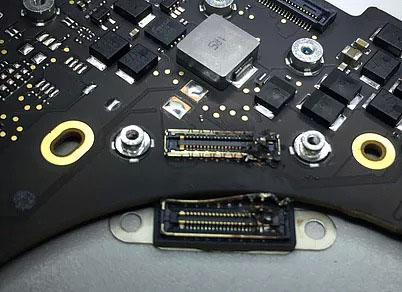
- Our Recovery Protocol: If your M-series MacBook Pro is completely dead due to a liquid spill, drop, or power surge, our micro-soldering engineers must perform component-level motherboard restoration. Under high-powered microscopes, we isolate and replace shorted capacitors, blown power rails, or fried Power Management ICs (PMICs). The singular engineering goal is to repair the original motherboard to a stable, temporary state so that the CPU can successfully initialize, decrypt its own storage, and allow a full forensic clone to be extracted.
2. The Intel T2 Security Era (Touch Bar Models: 2018–2020)
- Our Recovery Protocol: If the motherboard suffers a catastrophic failure that cannot be repaired using standard component replacement, our engineers must perform a delicate Cryptographic Chip Transplant. We must cleanly desolder the original CPU, the T2 chip, and the original NAND flash storage chips, reball them, and transplant the entire interconnected group onto a matching, functional donor logic board to restore the encryption path.
3. The Legacy Intel Era (Pre-2018 Models)
- Our Recovery Protocol:
- Removable SSDs: We extract the proprietary Apple SSD blade and place it into specialized hardware imagers (like the DeepSpar or PC-3000) that can directly manage degrading flash sectors and native Apple communication protocols.
- Mechanical Drives: If your older MacBook Pro is clicking or beeping, the internal mechanical drive has suffered a physical head crash or a seized motor. These units are safely moved to our ISO 5 Cleanroom for physical component repair and donor part replacement.
Critical Emergency Protocol for Failed MacBook Pros
- Stop Continuous Power-Cycling: If a MacBook Pro is failing or overheating, repeatedly holding down the power button to force reboots stresses unstable flash memory cells or failing power rails. If an internal component is shorted, continuous electricity can cause a thermal event that permanently cooks the nearby NAND chips.
- Avoid Target Disk Mode / Share Mode on Unstable Hardware: While Share Mode is a useful utility for healthy machines, forcing a MacBook Pro with degrading storage sectors or unstable logic board voltages to host a high-speed data stream will quickly cause the storage controller to permanently lock up or fail.
- Say No to Built-In "First Aid" Repairs: If your Mac's file system structure is unstable, running Disk Utility's First Aid or terminal commands like
fsckwill force aggressive write commands onto the volume. On an already failing APFS container, this can corrupt the master file system indexes, rendering data unrecoverable.