


















Seattle Data Recovery Utilizes Advanced Techniques to Retrieve Your Vital Data
- Details
- Written by: Seattle Data Recovery
- Category: Hard Drive Data Recovery
Call Seattle Data Recover at (206) 657-6685 For Windows Disk Recovery
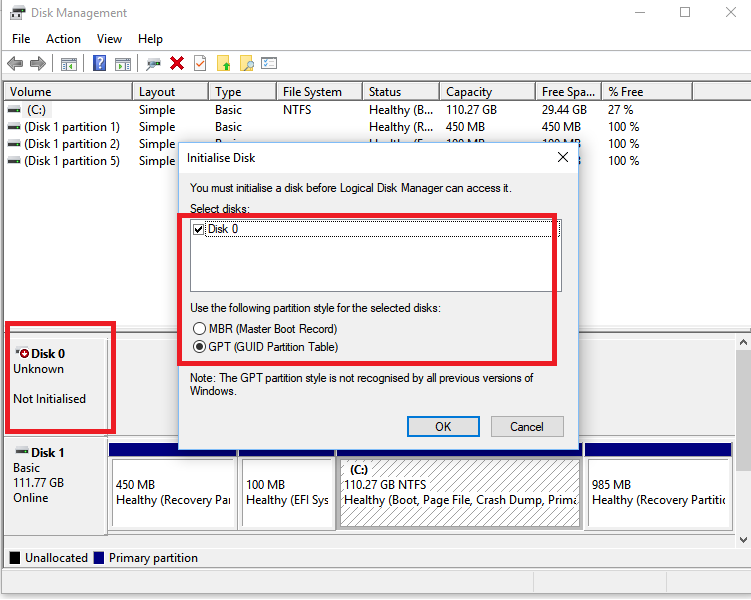
DO NOT INITIALIZE AN UNKNOWN DISK
DO NOT REBUILD THE MASTER BOOT RECORD (MBR)
DO NOT REBUILD THE GUIDED PARTITION TABLE (GPT)
These options are offered as Windows solutions to wipe everything and start fresh, hoping the disk will work again as an empty drive with a new drive letter. They are not offered as a data recovery solution. These options will erase your data, rebuild the drive records, and create empty space over your files. Contact Seattle Data Recovery as soon as you see any unknown disk error.
Read more: Seattle Data Recovery Utilizes Advanced Techniques to Retrieve Your Vital Data
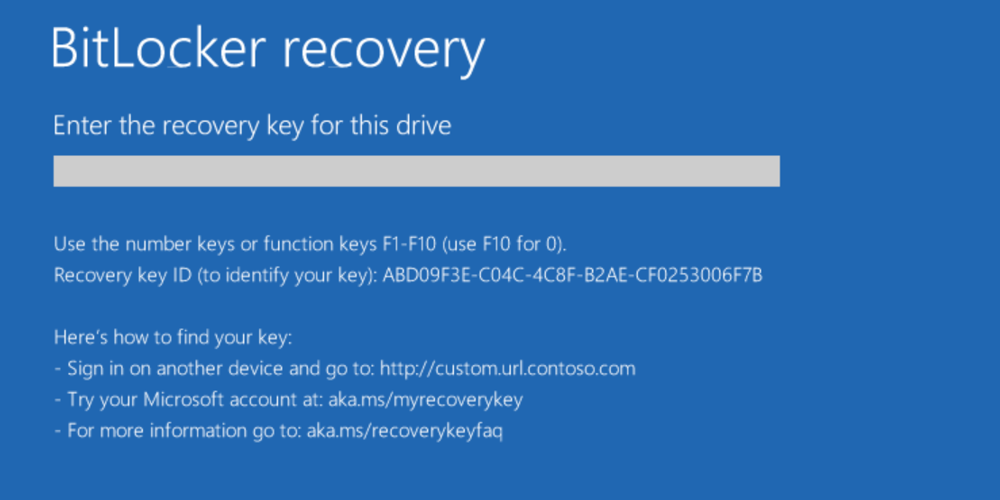
Seattle Data Recovery Restores Access to BitLocker-Encrypted Hard Drives
- Details
- Written by: Seattle Data Recovery
- Category: Data Recovery for Encryption
The Importance of Data Security
In today's digital landscape, data security remains paramount. With threats looming from cyberattacks, data loss, and unintentional deletions, users often employ encryption to protect valuable information. BitLocker is one of the most widely used encryption methods on Windows operating systems. However, the stakes are high when access to a BitLocker-encrypted hard drive is compromised. Seattle Data Recovery specializes in assisting users to regain access to their data, collaborating closely with computer manufacturers and Microsoft support teams to ensure a seamless recovery process.
Read more: Seattle Data Recovery Restores Access to BitLocker-Encrypted Hard Drives
Beyond the Logic Board: Seattle Data Recovery Performs Chip‑Off Recovery on Apple MacBook M5 Systems
- Details
- Written by: Seattle Data Recovery
- Category: MacBook Data Recovery
The New Frontier of MacBook Data Loss: Why M5 Changes Everything
Apple's MacBook M5 series represents a leap forward in performance, efficiency, and AI‑centric workflows. However, this leap also introduces a new level of complexity in data recovery. Traditional techniques that worked on Intel‑based Macs with removable SSDs no longer apply. Storage, security, and compute are now tightly fused into a single Apple Silicon package, transforming how experts must approach catastrophic data loss.
Because of this integration, when a MacBook M5 suffers severe physical damage, liquid intrusion, or total logic board failure, even Apple's own tools and standard software recovery methods may be powerless. This is precisely where highly specialized services, such as those offered by Seattle Data Recovery, become essential. Instead of treating data as stored on a separate, removable drive, technicians must work directly with the M5 System-on-Chip (SoC) and its integrated NAND flash memory.
Inside the M5 Architecture: Where Your Data Really Lives
To understand why chip‑off data recovery is sometimes necessary on the MacBook M5, you must first understand how Apple Silicon systems store data. On older Macs, your files lived on a standalone SSD module that could be removed and attached to another machine or a professional recovery rig. In stark contrast, M‑series Macs—including M1, M2, M3, M4, and now M5—solder the storage directly to the logic board and integrate it closely with the SoC.
Apple's M5 SSD subsystem is not just soldered storage; it is a tightly orchestrated system. Custom PCIe 5.0 NVMe technology, advanced controllers, and fast NAND flash combine to deliver extraordinary throughput—often exceeding 6,000 MB/s for both reads and writes. This performance is excellent for users, but it complicates recovery attempts. The storage doesn't behave like a generic SSD; instead, it's bound to Apple's unique encryption and security framework, which lives inside the SoC.
Security by Design: Encryption That Protects—and Complicates
Apple Silicon's security model is designed to protect users, which it does very effectively. The MacBook M5 uses hardware‑level encryption, tying data to cryptographic keys that live within the SoC and its secure enclaves. Consequently, removing the NAND chips—or even swapping in another M5 logic board—does not automatically grant access to the data. The data remains encrypted and useless without the correct keys.
This security is a double‑edged sword during a disaster. On one hand, it prevents attackers or thieves from easily extracting data from a stolen or disassembled MacBook. On the other hand, it makes legitimate data recovery far more complex. As a result, Seattle Data Recovery cannot simply "read the drive." Instead, they must understand how Apple's secure hardware, firmware, and storage layers interact, and they must use specialized forensic workflows to reconstruct access to encrypted information.
Why Traditional Recovery Fails on the MacBook M5
For routine issues—such as accidental file deletion, mild corruption, or a failing but still accessible system—software tools and macOS Recovery can often help. Disk Drill, native Time Machine backups, and Apple's built‑in recovery environment offer solid first lines of defense. However, these tools assume that the MacBook M5 can still boot or at least present its storage to the operating system in a semi‑functional state.
When the logic board fails, liquid destroys power-management circuits, or physical shock damages the SoC itself, the situation is very different. In these severe cases, the MacBook will not start, external boot methods fail, and even Apple service centers may declare the device "not recoverable." Because the storage is permanently soldered and cryptographically tied to that specific hardware, transplanting parts is not a viable option. At that stage, only chip‑off data recovery offers a potential path forward.
Seattle Data Recovery's Role: Specialists for the Worst‑Case Scenario
Seattle Data Recovery focuses on these worst‑case scenarios, where conventional options have been exhausted. Instead of operating like typical repair shops or generic data recovery outfits, they combine micro‑soldering expertise, forensic methodology, and deep knowledge of Apple Silicon systems. Their work on MacBook M5 models exemplifies how advanced data recovery has become a specialized branch of electronics forensics.
In practice, this means their engineers don't merely replace components or run software tools. Instead, they treat each MacBook M5 as a complex, encrypted puzzle. They work under high‑magnification microscopes, use micro‑hot air and controlled reflow techniques, and deploy specialized readers and adapters that can communicate with desoldered NAND devices and Apple SoC packages. Every move is deliberate because there may be only one opportunity to access the chip that holds irreplaceable data safely.
Plug In, Power Up, Recover: Seattle Data Recovery’s Custom HBA Cards Turn Chaos Into Data
- Details
- Written by: Seattle Data Recovery
- Category: Seattle Data Recovery
From "Uh‑Oh" to "All Good": Meet the Unsung Heroes of Data Recovery
There's a special kind of silence that hits when a critical drive goes offline.
The fans still spin, the LEDs still blink, but your precious data? Gone. Or at least, it seems that way.
That's where the quiet superheroes of the storage world walk onto the stage: HBA cards. And not just any HBAs—Seattle Data Recovery is manufacturing custom HBA cards specifically designed for data recovery labs that need precision, control, and reliability. Instead of crossing your fingers and hoping a failing RAID controller magically fixes itself, you can plug in dedicated hardware that speaks directly to your drives.
In data recovery, the goal is simple: get as close to the raw data as possible while changing absolutely nothing on the original drive. That's why professionals pair HBA SATA cards for PCIe with secure, write-blocking software to safely recover data from 2.5" SATA Hard Drives, 2.5" SATA SSDs, and M.2 SATA SSDs. The result? A clean, controlled environment where damaged arrays, dying disks, and mangled file systems finally start talking again.
What Exactly Is an HBA Card, and Why Should You Care?
Let's strip away the jargon. An HBA card (Host Bus Adapter) is basically a translator jammed into your server's PCIe slot. On one side, you've got your host—your computer or recovery server. On the other side, you've got your storage—SAS and SATA drives, SSD and HDD alike. The HBA sits in the middle, passing messages back and forth quickly and accurately, like the world's nerdiest interpreter.
Unlike RAID controllers, which try to be clever and manage entire arrays, an HBA keeps things simple. It focuses on clean, direct communication with each drive. That's exactly what data recovery techs want. No extra "help," no hidden caching, no creative reshuffling of data—just a transparent bridge from host to disk.
By offloading low-level storage communication from the CPU, the HBA makes sure data flows smoothly without bogging down your system. For data recovery, this isn't just a nice-to-have; it's vital when every second counts and every sector might be the last readable one. Stability and direct control matter more than fancy RAID tricks.
Why Data Recovery Pros Love HBAs More Than RAID Controllers
RAID controllers are fantastic—until they're not.
They're amazing at performance, redundancy, and presenting a neat logical volume to your operating system. But when something breaks? They can become your worst nightmare.
In a typical failure, the RAID controller may drop a disk, misinterpret metadata, or simply die. When that happens, your entire RAID volume can vanish in an instant. Trying to rebuild using the same controller or firmware can make things worse: it might initialize drives, overwrite metadata, or "fix" things in ways that permanently destroy recoverable data.
Data recovery professionals avoid that chaos by using HBA cards instead. When a RAID setup fails, they pull the individual drives, connect them to an HBA in IT Mode (Initiator Target mode) or JBOD mode, and let specialized software like UFS Explorer or R-Studio reconstruct the RAID layout. If the RAID controller is damaged, they take full control of the process.
Say Hello to IT Mode: When Your HBA Stops Being Clever (On Purpose)
In the world of HBAs, "IT Mode" is the magic phrase. Think of it as your HBA's "no nonsense" personality. In this mode, the card stops trying to act like a RAID controller and instead presents each physical drive directly to the operating system.
Manufacturers like LSI design many cards that can operate in either IR (Integrated RAID) or IT (Initiator Target) mode. For data recovery, IT mode is king. When technicians flash a card, such as the LSI 9211-8i, the HBA no longer abstracts or rearranges anything; it simply says, "Here are your drives, exactly as they are. Have fun."
This is crucial when working with RAID-5, RAID-6, RAID-10, or complex NAS arrays. Recovery software can now read each disk's raw data, parse the RAID metadata, and reconstruct the array virtually—without relying on the original, possibly damaged RAID controller. In other words, IT mode turns the HBA into a pure, honest bridge between your tools and the physical disks.
Seattle Data Recovery's Secret Sauce: Custom HBA Cards Built for Labs
Now, not all HBAs are created equal. Generic cards are fine for home servers and hobby projects, but professional data recovery labs need more than "fine." This is where Seattle Data Recovery steps into the spotlight with manufacturing custom HBA cards specifically tuned for recovery environments.
Instead of just reselling standard LSI or OEM boards, Seattle Data Recovery focuses on designing and refining PCIe HBA SATA cards that integrate cleanly with write-blocking workflows. Their hardware is tailored to support 2.5" SATA Hard Drives, 2.5" SATA SSDs, and M.2 SATA SSDs, giving technicians a unified way to attach a wide variety of drives in a controlled, predictable way.
These custom HBAs are built with data integrity in mind. The goal isn't just speed—it's signal quality, stability, and compatibility. In a lab, one flaky connection can corrupt an imaging session or cause a fragile, failing drive to lock up. By optimizing PCBs, connectors, and firmware behavior for recovery use, Seattle Data Recovery helps professionals get consistent, repeatable results when every drive may be a ticking time bomb.
Hardware + Software: How Write-Blocking Makes Recovery Safe
Here's the golden rule of data recovery: never write to the source drive. Once a sector is overwritten, no wizardry will bring the original data back. That's why pros use combinations of hardware and software write-blocking to protect every single source disk they touch.
Seattle Data Recovery's hardware is designed to pair seamlessly with secure, write-blocking software. The HBA manages the low-level communication, turning drives—SSD and HDD alike—into readable devices, while the software enforces strict read-only policies. Commands that might alter the disk are blocked, logged, or redirected, depending on the workflow.
This dual-layer approach does two things. First, it prevents accidental writes from the OS, drivers, or human error. Second, it enables more flexible imaging and analysis workflows, allowing the same source drive to be accessed multiple times without risk. Want to create multiple sector-by-sector images? Want to use different tools (UFS Explorer, R-Studio, etc.) on the same physical disk? With proper write-blocking, you can do that confidently.
Read more: Plug In, Power Up, Recover: Seattle Data Recovery’s Custom HBA Cards Turn Chaos Into Data
Breaking the Controller Barrier: Seattle Data Recovery Rescues Data with LSI HBA Cards
- Details
- Written by: Seattle Data Recovery
- Category: Seattle Data Recovery
When hard drives or SSD and HDD controllers fail, most people assume their data is gone for good. The drive stops mounting, the RAID collapses, and panic sets in. Yet at Seattle Data Recovery, that's exactly where the real work begins.
By bypassing faulty controllers and talking directly to the raw media, our engineers routinely bring "dead" disks back to life. One of our most powerful tools in that process is our line of HBA LSI cards—specialized Host Bus Adapters that let us see drives exactly as they are, without interference, and often without their original controller.
In this post, you'll discover how and why we use these cards, why "IT Mode" matters, and how this technology dramatically improves your chances of a successful recovery.
When Controllers Fail, Your Data Shouldn't: The Real Role of HBA Cards
Most users think of their storage as a black box: plug in a drive, and it either works or it doesn't. Beneath that simple experience, however, sits a critical and fragile component—the disk controller. When that controller fails on a hard drive or SSD, the drive can appear completely dead. Yet, crucially, the data on the platters or NAND chips may still be intact.
This is where traditional approaches fall short. Standard RAID controllers, USB adapters, or basic SATA ports rely on a functioning drive controller and standard protocols. If the drive's onboard electronics are misbehaving—even slightly—these everyday tools cannot cope. As a result, many shops stop at "sorry, it's unrecoverable."
At Seattle Data Recovery, we take a very different approach. Instead of giving up when a controller fails or is corrupted, we bypass it. Using carefully selected and tuned HBA LSI cards running in IT Mode, we talk directly to the disk at a much lower level. Consequently, we can often access sectors that standard systems never even attempt to read.
Under the Hood: What an HBA LSI Card Really Does
To understand why these tools are so powerful, you first need to know what an HBA LSI card is. An HBA (Host Bus Adapter) is a specialized expansion card that sits on your system's PCIe bus. Its job is simple in theory but profound in practice: bridge your system's CPU and memory to multiple storage devices—SAS, SATA, and SSDs—through high-speed, low-latency links.
Unlike consumer-grade SATA controllers or USB bridges, professional-grade LSI HBA cards are engineered for robust, consistent, and reliable disk access. They offer multiple SAS/SATA ports, support a wide range of drives, and are designed to operate under heavy, sustained workloads. That's why they're so common in servers, NAS devices, and homelab builds.
The most important difference for data recovery is how these cards can operate. Many LSI cards can be flashed into "IT Mode" (Initiator Target Mode). In this configuration, they stop acting like RAID controllers and instead present each drive as a raw, individual device to the operating system. There is no abstraction layer, no RAID logic, and no smart hiding of drive behavior—just clean, direct access. For recovery engineers, that's pure gold.
IT Mode vs RAID Mode: Why Direct Access Saves Your Files
RAID cards are fantastic for uptime and performance in production. Yet during data recovery, their strengths transform into weaknesses. RAID controllers aggregate disks into logical volumes, masking the physical layout and often making "best guesses" about failing hardware. When you're trying to rescue every sector you can, guesses are the last thing you want.
By contrast, LSI HBA cards in IT Mode expose each SSD and HDD exactly as it exists: one disk, one device, with no RAID translation in between. Consequently, if a drive is slow, misreporting sectors, or intermittently failing, we can clearly see that behavior. Our forensic tools can adapt dynamically, rather than relying on a controller that tries to "fix" or hide problems.
Many RAID controllers simply refuse to work with a badly degraded disk. They drop it from the array, mark it as "failed," or refuse to initialize it. In a normal server, this is desirable. In a recovery lab, it's catastrophic. IT Mode HBA cards don't make those decisions for us. They give us the raw truth and let our engineers, together with specialized imaging software and hardware, handle the complexity.
Read more: Breaking the Controller Barrier: Seattle Data Recovery Rescues Data with LSI HBA Cards
Page 3 of 265