




















When Your APFS WD My Passport Fails: Why Professional Data Recovery Is Your Safest Bet
- Details
- Written by: Seattle Data Recovery
- Category: Apple Computer Data Recovery
The Silent Crisis: When a WD My Passport Suddenly Vanishes
One moment, your Western Digital My Passport works flawlessly, storing years of photos, business documents, and creative projects. The next moment, your Mac refuses to recognize it, or Disk Utility warns that the APFS volume is corrupted. In a digital-first world, this scenario is not just an inconvenience; it is a potential crisis that can impact your personal life, business continuity, and legal or compliance obligations.
External drives are often treated as "safe boxes" for critical data. However, like any mechanical and electronic device, they can fail without much warning. When that drive is formatted with APFS—the Apple File System used on modern macOS devices—the complexity of the file system and frequent encryption add another layer of difficulty. At this stage, DIY attempts can easily worsen the situation and reduce the chances of successful recovery.
Professional data recovery exists precisely for moments like these. Trusted labs, including providers specializing in Western Digital My Passport recovery and regional experts such as Seattle Data Recovery firms, bring together specialized hardware, advanced software, and deep APFS expertise. Their goal is simple yet demanding: safely retrieve as much of your data as technically possible, even when the drive is failing or appears completely dead.
Why APFS Changes the Rules of Data Recovery
APFS fundamentally changed the way macOS stores and manages data. Designed for SSDs and modern storage needs, it introduces concepts like containers, snapshots, cloning, and strong encryption. While these features improve performance and security, they also make data recovery significantly more complex than with older file systems like HFS+.
When a Western Digital My Passport is formatted with APFS, its structure becomes more complex. A single physical drive might include multiple APFS containers and volumes, each with its own metadata, snapshots, and, potentially, encryption layers such as FileVault. If metadata becomes corrupted or the container structure is damaged, your Mac might display the drive as unformatted or refuse to mount it.
Standard consumer tools and built-in utilities—such as Disk Utility's First Aid—have limited capabilities when APFS corruption is severe. They may fix minor logical issues, but they lack the low-level analysis and recovery algorithms used by professional applications like UFS Explorer, R-Studio, or specialized APFS analyzers. Consequently, what appears "unrecoverable" to a home user may still be salvageable in a professional lab.
From First Aid to Failure: Recognizing When DIY Stops Helping
The first instinct when a drive misbehaves is to reach for the tools you know. On macOS, that typically means Disk Utility's First Aid, perhaps followed by consumer-friendly recovery software such as Disk Drill or EaseUS. These tools can be effective in certain situations, especially when dealing with simple logical problems like accidental deletion or mild file system inconsistencies.
Read more: When Your APFS WD My Passport Fails: Why Professional Data Recovery Is Your Safest Bet
Seattle Data Recovery Restores Crucial (Micron) SSDs
- Details
- Written by: Seattle Data Recovery
- Category: Data Recovery for All Storage Manufacturer Brands
The Importance of Data Recovery
Data has become an invaluable asset for individuals and businesses in today's digital age. Losing access to this information can be distressing, whether it's cherished family photos, critical business documents, or expansive research data. Searching for a reliable service provider becomes paramount when faced with data loss. In Ballard, Seattle Data Recovery is the most trusted source for recovering data from Crucial (Micron) SSDs. With expertise in repair and recovery, they address various challenges that SSDs present, allowing users to reclaim their lost data effectively.
Seattle Data Recovery specializes in various SSD brands, including Crucial, a subsidiary of Micron Technology, renowned for its high-performance storage solutions. The proprietary technologies employed by these drives make data recovery complex yet achievable. Understanding the nuances associated with data recovery can empower users, ensuring they approach the recovery process confidently and with the right expectations.
Understanding Crucial (Micron) SSDs
The Rise of SSD Technology
Solid State Drives (SSDs) have revolutionized the storage landscape, offering faster data access speeds, greater reliability, and energy efficiency than traditional hard disk drives (HDDs). Within this domain, Crucial (Micron) has positioned itself as a leader, offering a variety of SSDs that cater to diverse needs, from budget options to high-performance models. The technological innovation distilled into these drives underscores their dominance in the storage market, accompanied by a loyal customer base that trusts their products for critical data storage.
Crucial's SSDs often incorporate advanced features like proprietary firmware and optimized controllers, which provide enhanced performance. However, such sophistication can also lead to challenges during data recovery. Identifying the specific characteristics of Crucial SSDs sets the stage for understanding the recovery process, laying a solid foundation for users seeking professional assistance.
Read more: Seattle Data Recovery Restores Crucial (Micron) SSDs
Navigating I/O Device Errors that Threaten Your Data
- Details
- Written by: Seattle Data Recovery
- Category: Hard Drive Data Recovery
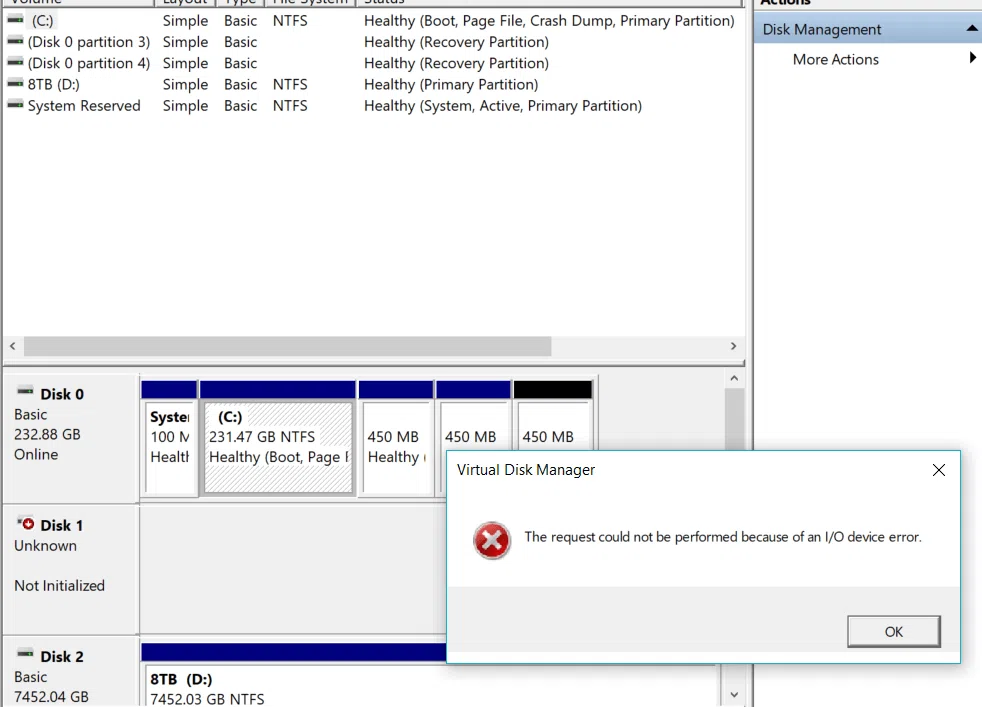
Our reliance on technology and data integrity has never been higher in today's digital world. When your computer displays the ominous message, "The request could not be performed because of an I/O device error," it signals a potential catastrophe for your information. Such an error not only disrupts your workflow but also instills a sense of dread regarding the safety of your valuable data. Seattle Data Recovery addresses the implications of this issue, explores potential causes, and emphasizes the importance of seeking professional help from Seattle Data Recovery services.
Read more: Navigating I/O Device Errors that Threaten Your Data
Beyond the Controller: Seattle Data Recovery Uses HBA LSI Cards to Revive “Dead” Drives
- Details
- Written by: Seattle Data Recovery
- Category: Seattle Data Recovery
When the Controller Fails but Your Data Is Still Alive
Most people assume that when a hard drive or SSD stops appearing in the BIOS or operating system, the data is gone forever. In reality, a large percentage of "dead" drives fail not because the data is destroyed, but because the onboard controller has stopped functioning. The flash or magnetic platters may still contain fully intact data; the system has no reliable way to talk to them.
This is where Seattle Data Recovery takes a radically different approach. Instead of accepting the drive's own controller as a single point of failure, our engineers bypass it whenever possible. By leveraging a carefully curated line of custom HBA cards based on proven LSI (now Broadcom) chipsets, we can often communicate with SSD and HDD media at a much lower level than the original controller was ever designed to allow. As a result, data that appears completely unreachable to standard systems can suddenly become readable again.
The Hidden Weak Link: Why Controllers Fail on SSD and HDD Devices
Every modern SSD and HDD is, in effect, a small computer. It contains a controller chip, firmware, RAM, and various support components that orchestrate how data is read, written, cached, and managed over time. This controller translates between the logical world of files and folders and the physical layout of bits on flash cells or magnetic platters. When that controller fails, the entire drive often becomes inaccessible in an instant.
Controller failures are more common than most users realize. Power surges, firmware bugs, overheating, manufacturing defects, and even simple aging can all cause the controller logic to malfunction. The host computer sees timeouts, I/O errors, or simply no drive at all. Yet the underlying storage media can still hold your data in pristine form. The key challenge is finding a way to communicate with the media without depending on the faulty controller.
Seattle Data Recovery specializes in separating those two worlds: the failing controller and the still-viable data. Instead of only attempting to repair or work through the existing controller, our lab uses specialized techniques and hardware to route around it. By doing so, we significantly increase the odds of successful recovery from both consumer‑grade and enterprise‑class SSD and HDD devices.
What Is an HBA Card—and Why It Matters for Data Recovery
An HBA (Host Bus Adapter) Card is a storage interface card that plugs into a server's PCIe slot and provides direct connectivity to multiple SAS and SATA drives. Unlike traditional RAID controllers, which abstract individual disks behind logical volumes and proprietary metadata, HBAs in "IT mode" present each drive directly to the operating system.
LSI, now part of Broadcom, has a long track record of making reliable, high‑performance SAS/SATA controller chips used throughout the industry. Their HBA cards support a wide range of operating systems while delivering consistent throughput of up to 6Gb/s and 12Gb/s SAS standards on PCIe 2.0 and PCIe 3.0 interfaces. For data recovery, that combination of performance, transparency, and stability is crucial. It allows engineers to attach problematic drives in a clean, controlled environment that avoids the quirks and limitations of consumer motherboard chipsets.
At Seattle Data Recovery, we have taken this a step further. We have assembled and tuned a line of custom HBA cards based on LSI silicon, specifically optimized for use in a data recovery lab. These custom HBA cards provide reliable, low-level access to SSD and HDD media while supporting the many variations and edge cases we encounter in the field. They form the backbone of our ability to bypass faulty controllers and extract data that other tools cannot even see.
IT Mode, Not Magic: Why Pass‑Through Is Essential
The single most important feature of an HBA LSI card in data recovery work is its ability to run in "IT mode" (initiator target mode), commonly called pass‑through. In IT mode, the card does not attempt to build RAID sets, cache data, or manipulate how drives are presented. Instead, it exposes each attached drive as an individual device, with minimal interference or abstraction. That transparency is exactly what we want when we are trying to coax data out of a marginal or damaged disk.
Traditional RAID controllers, by contrast, introduce multiple layers of complexity. They can hide individual drives behind virtual volumes, rewrite metadata, or attempt to "help" by rebuilding arrays. These behaviors are ideal for uptime in production environments, but they are extremely problematic when you are trying to perform forensic‑grade recovery. Any additional abstraction layer can introduce new errors or even overwrite valuable metadata needed to reconstruct the original volume.
By using HBA LSI cards in IT mode, Seattle Data Recovery keeps the relationship between the host and the drive as simple as possible. The card faithfully passes commands and responses between our recovery systems and the storage devices. This approach allows our engineers to use specialized software and firmware‑level tools that directly interrogate the SSD and HDD hardware, capture raw sectors, and safely work through intermittent read issues—all without an additional RAID layer complicating the picture.
How Bypassing a Faulty Controller Actually Works
Bypassing a faulty controller is not as simple as plugging a drive into an HBA and watching it magically appear. In many cases, the drive's native controller is still present on the device and still connected to the SATA or SAS port. Moreover, SSDs often incorporate flash translation layers (FTLs), wear‑leveling logic, and encryption within their controllers. Nonetheless, there are several scenarios where carefully chosen hardware and techniques can sidestep or neutralize failing controller behavior.
On traditional spinning HDDs, controller boards are typically removable. When a PCB fails, we may replace or temporarily pair it with a compatible OEM board, then attach the drive to an HBA LSI card in a controlled lab rig. The HBA's clean, robust signaling and broad compatibility often allow us to stabilize borderline drives, reduce command timeouts, and access data sectors that standard consumer hosts repeatedly fail to read. In some cases, we may also reprogram ROM chips or adapt firmware to coax the media into a readable state while our HBA setup performs a sector‑by‑sector clone.
SSDs are more complex because the controller is intimately tied to how data is distributed across NAND chips. However, there are still cases where controller firmware corruption, interface negotiation problems, or partial component failure can be mitigated. For example, we may use HBA LSI cards with advanced logging and diagnostic capabilities to communicate at a lower level with an SSD that no longer enumerates properly on a desktop system. In combination with our specialized equipment and knowledge of vendor‑specific command sets, this can enable us to stabilize the device long enough to extract critical data before it fails.
Why Seattle Data Recovery Builds on Custom HBA Cards
Off‑the‑shelf HBA LSI cards already offer excellent reliability and performance, but data recovery has requirements that far exceed typical home lab or NAS use. We routinely encounter drives that exhibit sporadic timeouts, marginal signaling, damaged connectors, and unorthodox firmware states. In these edge cases, even minor differences in power delivery, cooling, cabling, or firmware behavior can determine whether a drive is readable for 10 minutes, 10 seconds, or not at all.
To address this, Seattle Data Recovery uses custom HBA cards that are purpose‑built and carefully vetted for recovery workflows. We select specific LSI chipsets that have superior error‑handling characteristics, mature firmware, and broad compatibility. Then, we pair them with matched expanders, cables, and enclosures. Our engineering team tests these combinations under a range of fault conditions to understand how the hardware behaves when faced with degraded SSD and HDD devices.
We fine‑tune firmware settings for pass‑through mode, error timeout thresholds, reset behavior, and logging. These customizations help us strike the right balance between persistence and caution: we want the card to retry reads intelligently, but we do not want it to hammer a failing drive until it suffers catastrophic damage repeatedly. The result is a stable, predictable platform that we can trust when attempting delicate operations on irreplaceable client data.
Read more: Beyond the Controller: Seattle Data Recovery Uses HBA LSI Cards to Revive “Dead” Drives

Mastering Data Rescue: Seattle Data Recovery's Solutions in Laurelhurst
- Details
- Written by: Seattle Data Recovery
- Category: Seattle Data Recovery
A Lifeline for Your Data
In today's digital age, data holds immense value. It encompasses cherished memories captured in photographs, critical business documents, and essential correspondence. However, unforeseen events can disrupt this digital landscape, leading to data loss that many individuals and businesses experience. For residents of Seattle, particularly those in the Laurelhurst neighborhood, Seattle Data Recovery stands as a beacon of hope for those grappling with data loss. This professional service specializes in recovering data from a variety of storage devices, ensuring that whether you're a busy professional or a casual user, your data can be restored and reintegrated into your life.
In the following sections, we will examine the various facets of data recovery services offered by Seattle Data Recovery. We will delve into the types of storage devices they support, the specific services tailored for mobile devices, and the expertise of their skilled professionals. With this information, customers can confidently navigate their options when faced with data loss.
Understanding Data Loss: Causes and Implications
The Many Faces of Data Loss
Data loss can occur due to a myriad of reasons. Hardware malfunctions, software corruptions, accidental deletions, and natural disasters can all contribute to this unfortunate event. Understanding these causes is crucial for both prevention and recovery strategies. For instance, mechanical failures in traditional hard drives are relatively common, while software glitches often arise during system updates or installations. Recognizing these challenges empowers users to take preventive measures, such as regularly backing up data to external storage or the cloud.
The implications of data loss extend beyond mere inconvenience. For businesses, losing critical files can cripple operations, resulting in financial loss and reputational damage. On a personal level, losing invaluable photos or important documents can lead to emotional distress. In this light, data recovery services like those provided by Seattle Data Recovery become indispensable.
The Importance of Professional Recovery
Though individuals might attempt DIY recovery solutions, these approaches often exacerbate the issue rather than resolve it. In contrast, professionals at Seattle Data Recovery have the experience and tools to recover lost data safely. They can meticulously assess the damage, apply the correct recovery techniques, and ultimately restore data integrity. By seeking professional assistance promptly, users increase their chances of successful recovery while preserving both the qualitative and quantitative aspects of their data.
Read more: Mastering Data Rescue: Seattle Data Recovery's Solutions in Laurelhurst
- Seattle Data Recovery Utilizes Advanced Techniques to Retrieve Your Vital Data
- Seattle Data Recovery Restores Access to BitLocker-Encrypted Hard Drives
- Beyond the Logic Board: Seattle Data Recovery Performs Chip‑Off Recovery on Apple MacBook M5 Systems
- Plug In, Power Up, Recover: Seattle Data Recovery’s Custom HBA Cards Turn Chaos Into Data
Page 2 of 265