






























Beyond the Logic Board: Seattle Data Recovery Performs Chip‑Off Data Recovery on Apple MacBook M4 Systems
- Details
- Written by: Seattle Data Recovery
- Category: Macbook Pro Data Recovery
When Your MacBook M4 Is "Beyond Repair": Why Chip‑Off Recovery Exists
When an Apple MacBook with an M4 chip fails catastrophically, it often feels like the end of the road for your data. The logic board is dead; the Mac does not power on, and even Apple technicians may say there is no way to retrieve the data stored on the device. Yet, in some of these extreme cases, chip‑off data recovery offers one final, highly specialized path to rescue mission‑critical files.
Seattle Data Recovery operates in this narrow, demanding space. On MacBook M4 systems, they use advanced chip‑off techniques to attempt to extract data directly from the soldered NAND flash memory. This method is unequivocally a last resort. Nevertheless, when backups are missing and the Mac is irreparably damaged, chip‑off data recovery may be the only realistic chance to recover irreplaceable photos, financial data, design projects, or corporate intellectual property.

Beyond Speed: The M5 MacBook Pro’s PCIe 5.0 SSD Redefines Laptop Storage
- Details
- Written by: Seattle Data Recovery
- Category: Macbook Pro Data Recovery
A Silent Revolution Under the Hood
Apple's M5 MacBook Pro is attracting attention for its new chip, stunning displays, and impressive battery life. However, one of the most transformative upgrades sits quietly inside the chassis: a radically faster, custom SSD architecture built on PCIe 5.0. This is not a minor spec bump—it is a fundamental redesign of how storage works in a MacBook.
With the M5 generation, Apple has finally moved its internal SSDs to PCIe 5.0, routing more lanes directly to the storage subsystem and pairing them with faster NAND and a more capable controller. As a result, the M5 MacBook Pro now delivers read and write speeds exceeding 6,000 MB/s, blowing past the M4's performance by roughly 2.5x–3x in many real‑world scenarios. This leap does more than win benchmarks; it changes how the machine feels day to day.
For creative professionals, developers, and power users, storage is no longer a quiet bottleneck hidden behind a fast CPU and GPU. Instead, the SSD becomes a full partner in performance. From massive 8K video timelines to multi‑gigabyte AI models, data moves so quickly that many workflows feel unconstrained by disk throughput for the first time in a MacBook form factor.
The M5 SSD Architecture: More Than Just Faster NAND
Custom PCIe 5.0 NVMe at the Core
At the heart of the M5 MacBook Pro's storage system is a custom Apple PCIe 5.0 NVMe SSD. While PCIe 4.0 remains standard across most premium laptops, Apple's adoption of PCIe 5.0 in the M5 line marks a strategic shift toward even higher bandwidth and lower latency. Instead of simply dropping in off‑the‑shelf SSD components, Apple designed a tightly integrated solution that speaks directly to the M5 SoC.
Crucially, M5 Pro and Max configurations route up to 8 PCIe lanes to the SSD. This expanded lane allocation gives the drive far more bandwidth headroom than previous MacBook generations, which often had to balance limited PCIe lanes between graphics, storage, and I/O. In the M5 era, storage finally receives front‑row treatment in Apple's performance story.
Read more: Beyond Speed: The M5 MacBook Pro’s PCIe 5.0 SSD Redefines Laptop Storage

From Rugged Shell to Fragile Data: Professionals Rescue APFS‑Formatted LaCie Drives from Disaster
- Details
- Written by: Seattle Data Recovery
- Category: Seattle Data Recovery
When "Rugged" Isn't Enough: The Real Risks Facing LaCie Drives
LaCie rugged drives have earned a reputation for reliability, especially among creative professionals who move data between studios, sets, and client sites. Their shock-resistant casings, rubber bumpers, and robust connectors inspire confidence. However, no amount of exterior protection makes a drive invincible. Inside every LaCie rugged unit is a delicate mechanical or solid-state device, and when it fails, mission-critical photos, videos, and documents can vanish in an instant.
Modern macOS users increasingly format these drives as APFS (Apple File System) to gain performance, snapshots, and encryption benefits. While APFS provides advanced capabilities, it also introduces complexity during data loss incidents. Consequently, when a rugged LaCie drive fails, the combination of hardware vulnerabilities and APFS intricacies turns recovery into a specialized discipline that extends far beyond plug‑and‑play software.
Why APFS Changes the Game for Professional Data Recovery
APFS is designed for SSDs and modern workflows, but Apple's file system also underpins many external LaCie drives used with macOS. It introduces features such as volume groups, snapshots, cloning, and native encryption (e.g., FileVault 2/APFS). These features are fantastic for performance and security. However, they make recovery far more complex than older file systems like HFS+ or exFAT.
The Hidden Anatomy of a "Rugged" Failure
Despite their impressive shock resistance, LaCie rugged drives can still suffer serious internal damage from drops, bumps, and power issues. A sudden impact, especially while the drive is spinning or being accessed, can cause head crashes, misaligned components, or even platter surface damage. Internally, traditional HDD-based LaCie drives have moving parts that tolerate only limited physical abuse before they begin to fail.
Power losses and unstable connections can corrupt file system structures—even when the hardware survives. An unexpected disconnect during a write operation may leave APFS metadata in an inconsistent state. Over time, repeated minor shocks and power events accumulate, leading to intermittent read errors, strange clicking sounds, or the dreaded "drive not recognized" error. What appears to be a single, sudden failure often reflects weeks or months of underlying degradation.
Seattle Data Recovery Restores LTO-5 Tape Data
- Details
- Written by: Seattle Data Recovery
- Category: LTO Tape Data Recovery
The Critical Role of LTO-5 Tapes in Modern Data Storage
In today's digital era, data has become the backbone of business continuity, innovation, and decision-making. Linear Tape-Open (LTO) technology, particularly the LTO-5 generation, has emerged as a trusted and cost-effective solution for organizations seeking reliable data archival and backup. Featuring impressive capacity and interoperability, LTO-5 tapes have become integral for safeguarding critical information.
However, despite their robustness, LTO-5 tapes are susceptible to various forms of physical and logical damage that can jeopardize access to vital data. When data loss occurs, it is essential to rely on specialized professionals—such as Seattle Data Recovery—to perform effective and secure LTO-5 tape data recovery. This blog explores the intricacies of LTO-5 tape failures, the factors influencing data recovery, and how trusted experts restore invaluable digital assets.
Understanding LTO-5 Tape Technology: Foundations and Significance
LTO-5, or Linear Tape-Open 5, marks a milestone in tape storage technology with its impressive native capacity of 1.5TB, which can be expanded to 3TB with compression. As part of the broader LTO family, LTO-5 continues to influence storage strategies by providing a scalable, reliable, and cost-efficient medium for long-term data preservation. Its compatibility with existing infrastructure and support for features like Linear Tape File System (LTFS), WORM, and hardware encryption make it a versatile choice for enterprises and data centers.
From regulatory compliance to disaster recovery, the adoption of LTO-5 tapes underscores a commitment to data integrity and security. Despite these advantages, users must recognize that tapes are vulnerable to environmental, mechanical, and media-related risks that can result in inaccessible data. In such scenarios, expert professionals in LTO-5 tape data recovery play a vital role in minimizing downtime and restoring critical information.
Common Causes of LTO-5 Tape Failures
While LTO-5 tapes are designed for durability, they are not immune to failure. Several environmental and mechanical factors can compromise the integrity of data stored on these tapes. Recognizing these failure points allows organizations to implement preventative measures effectively, reducing the need for costly data recovery processes.
Environmental factors, such as extreme temperature variations and high humidity levels, significantly influence tape longevity. Excessive heat can cause media degradation, while humidity fosters corrosion, especially in the sensitive tape media and drive components. Dust and debris accumulation can also impair the operation of tape drives by clogging read/write heads, leading to errors and increased wear. These factors underscore the importance of controlled storage environments and regular maintenance.
Physical damage is another leading cause of failure. Mechanical shocks—such as dropping an LTO-5 cartridge—may lead to broken cases or dislodged leader pins, which are critical for proper tape loading. Additionally, wear and tear on the drive's read/write heads over time can lead to reduced performance and errors. Drive issues, including power supply problems and microcode errors, further complicate the recovery landscape.
Media health remains a core concern. Low-quality tapes or those subjected to improper handling may develop physical deformities or data corruption. Understanding the complex web of potential failure points is essential for both prevention and effective response when issues inevitably arise.
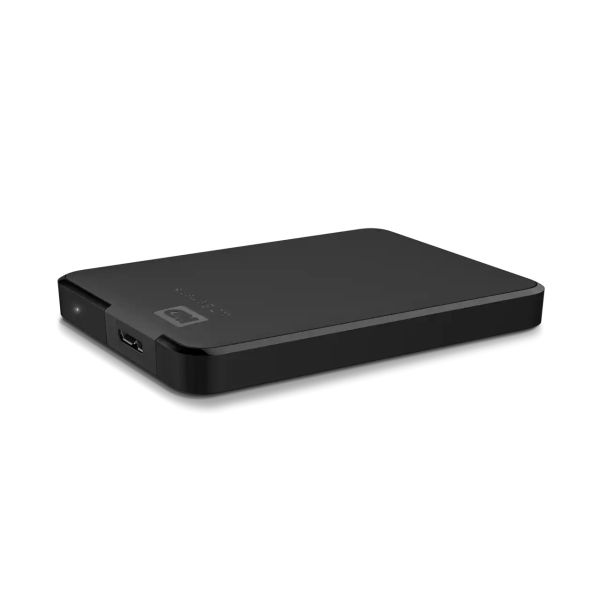
Product Warning for Western Digital WD Elements Portable: Data Recovery Is Complex
- Details
- Written by: Seattle Data Recovery
- Category: Portable Hard Drive Data Recovery
Understanding the Growing Complexity of WD Elements Portable Data Recovery
In today's digital age, external hard drives such as the WD Elements Portable have become indispensable for storing and transferring critical data. However, when these drives encounter failures, the recovery process can become unexpectedly complicated. Seattle Data Recovery has observed a sharp increase in requests related to these devices, particularly due to their unique design features—most notably, soldered USB ports and hardware-level encryption. As a result, owners find themselves facing obstacles that demand advanced technical expertise, specialized equipment, and considerable patience.
The product Warning details various factors that contribute to the complexity of recovering data from WD Elements Portable drives. We will examine the distinct hardware configurations, encryption methodologies, firmware architecture, and physical damage factors that render traditional data recovery methods ineffective. By understanding these challenges, users can better appreciate the importance of consulting professional recovery services and avoid costly DIY attempts that could cause further damage.
The Hidden Dangers of Soldered USB Ports in WD Elements Portable Drives
One of the fundamental reasons data recovery for WD Elements Portable drives can be particularly difficult originates from their design choice to solder the USB port directly onto the main PCB. Unlike conventional external drives that use a removable bridge board to connect the USB interface to the internal SATA drive, many WD models incorporate this circuitry directly into the drive's main circuit board. This integration eliminates the easy access point that technicians and enthusiasts typically use to bypass USB-related faults.
If the USB port or the integrated controller becomes damaged, the drive often becomes entirely inaccessible through standard connections. Attempting to bypass or repair this soldered-on port involves sophisticated soldering procedures, delicate micro-welding, and a high risk of further damage. These procedures require specialized tools and expertise, making DIY repairs highly inadvisable. As such, professional data recovery services, such as Seattle Data Recovery, are often the best choice for handling these intricate hardware challenges efficiently and safely.
This design choice also complicates any subsequent recovery process, as the entire drive's accessibility hinges on the integrity of the soldered circuit board. When failure occurs, the only viable way to recover data involves complex hardware intervention, often extending recovery timelines considerably.
Read more: Product Warning for Western Digital WD Elements Portable: Data Recovery Is Complex
Page 5 of 265