

Call 1 (425) 406-1174 to start a Data Recovery!
Hard Drive Repairs
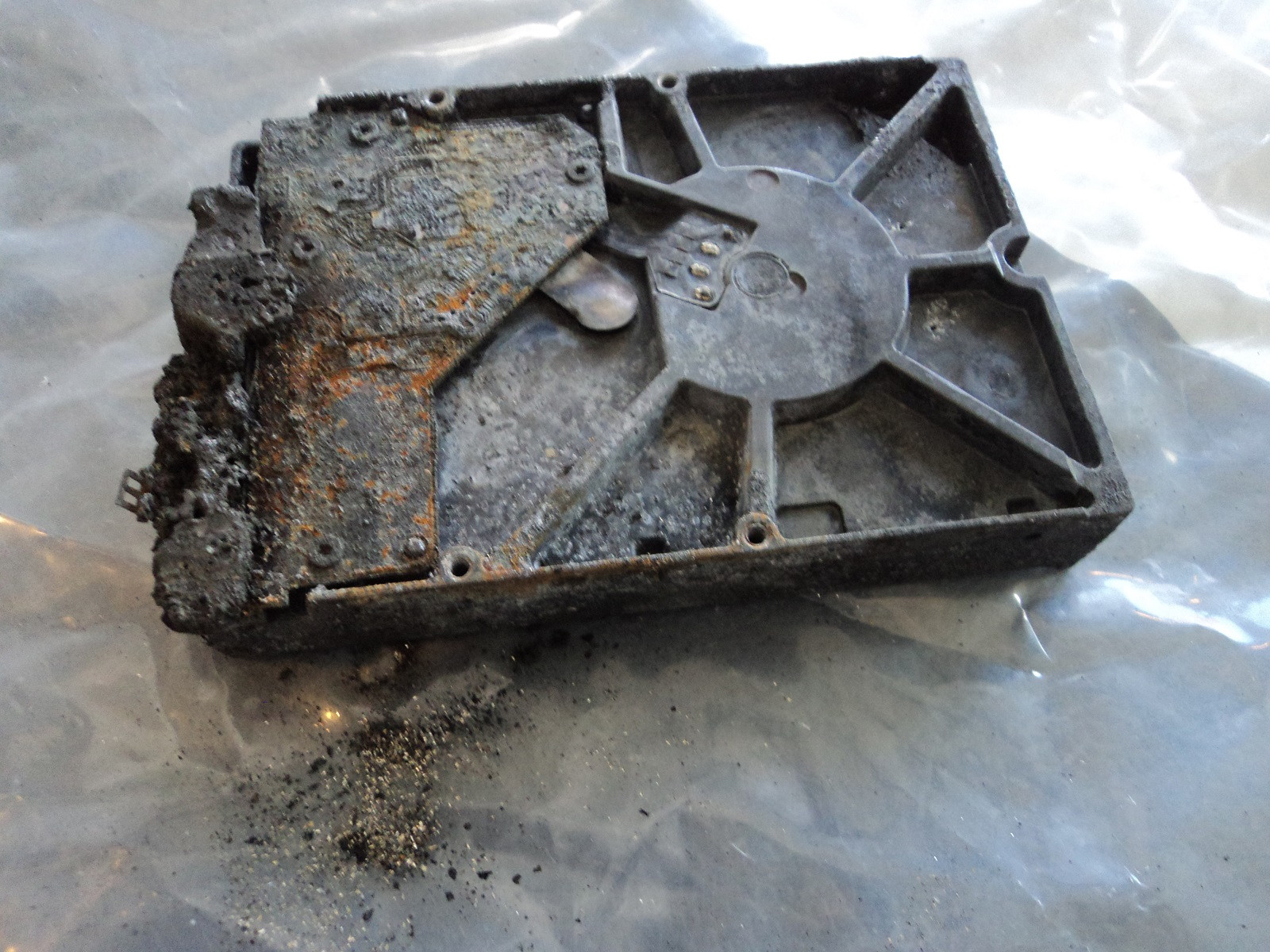
Hardware-Level Hard Drive Repair for All Brands by Seattle Data Recovery
Universal Failure Tiers & Brand-Specific Engineering Protocols
Western Digital (WD): Bypassing Integrated USB & Encryption
- The Hardware Hurdle: Most portable WD drives (like the My Passport series) do not feature a standard SATA connector. Instead, the USB port and a hardware encryption chip are soldered directly to the main Printed Circuit Board (PCB).
- Our Repair Protocol: If the board suffers a short circuit or the USB port breaks, our technicians perform precision micro-soldering. Under magnification, we tap directly into the drive’s core SATA transmission lines on the board, routing them out to our diagnostic hardware while keeping the encryption chip active to prevent data scrambling.
Seagate: Resolving Seized Spindles & Firmware Loops
- The Hardware Hurdle: Seagate drives feature a compact mechanical design that makes them prone to a "seized spindle motor" or stuck heads if dropped. Additionally, their Media Cache architecture can get trapped in a permanent firmware lock loop when it hits corrupted data sectors.
- Our Repair Protocol: For stuck components, the drive is moved to our dust-free cleanroom where engineers use specialized mechanical tools to safely unstick the head assembly or cleanly migrate the platters to a matching donor chassis. For firmware loops, we link directly to the drive’s system terminal to patch its internal code via RAM commands.
Toshiba: Clearing G-Sensor Lockouts
- The Hardware Hurdle: Toshiba external lines (Canvio series) feature built-in hardware accelerometers (G-Sensors) designed to instantly lock the drive if motion is detected. A sudden drop can trap the drive in a defensive, non-responsive firmware loop.
- Our Repair Protocol: Much like WD, modern Toshiba portable drives utilize integrated USB boards. We convert the native board to a raw SATA path, allowing us to transmit low-level commands that clear out the persistent error logs trapped in the drive’s system memory, stabilizing the controller for data mirroring.
HGST / SanDisk Professional: Enterprise Multi-Platter Alignment
- The Hardware Hurdle: HGST and G-Technology drives spin at higher RPMs (7200 RPM) and often feature tight, multi-platter stacks. They use highly unique NVRAM chips on their PCBs containing custom adaptive alignment data for that specific drive's internal read/write heads.
- Our Repair Protocol: If the PCB fails due to power surges, a simple board swap will fail. Our technicians desolder the original microscopic NVRAM chip and cleanly transplant it onto a perfectly matched donor PCB. Mechanical repairs are performed with absolute precision to maintain the alignment of the multi-platter stack.
The Seattle Data Recovery Hardware Repair Process
- The Cleanroom Inquest: If a drive is clicking, grinding, or beeping, it is never powered on in a standard room. It is opened strictly inside an ISO 5 Cleanroom environment where airborne particles are filtered down to microscopic levels. This prevents dust from landing on the platters and permanently scratching away data.
- Donor Part Matching: Physical part replacements require an incredibly precise match. We maintain an extensive inventory of donor drives, matching not just the model number, but also manufacturing dates, site codes, and internal pre-amplifier revisions.
- Forensic Cloned Imaging: Repaired hard drives are highly unstable and are never meant to be returned to normal use. Once the drive spins up smoothly, it is immediately attached to a hardware imager to create a bit-for-bit digital clone. We extract your data safely from this healthy clone.
Emergency Guidelines: Protect Your Media from Permanent Loss
- Disconnect Power Immediately: If the drive is making unusual sounds (clicking, beeping, buzzing), pull the plug. Keeping it powered on can cause a broken read head to physically dig into the spinning platter, shredding your data into unrecoverable dust.
- Say No to DIY Software: File recovery programs are designed for healthy drives with deleted files. Forcing software to scan a drive with a physical head or firmware failure will rapidly overheat and permanently destroy the unit.
- Do Not Open the Drive Casing: Cracking open a hard drive cover outside of a certified cleanroom immediately ruins the drive's internal environment, exposing the platters to millions of microscopic airborne contaminants.
- Details
- Written by: Seattle Data Recovery
- Category: Hard Drive Repairs
Understanding Firmware: The Lifeblood of Your Hard Drive
To grasp the significance of firmware in a hard drive, it's essential to understand its role as the drive's operating system. Firmware consists of low-level instructions permanently stored in the hard drive's hardware, orchestrating essential operations that keep the device functional. From spinning the platters that store data to managing the movement of the read/write heads, firmware plays a pivotal role in ensuring seamless data access.
Firmware acts as a crucial intermediary between the hard drive's physical components and the computer's operating system. It translates logical addresses, guiding the hardware in locating specific data on the drive. This intrinsic relationship underscores the importance of maintaining firmware integrity and functionality. Without it, even the best hardware becomes an ineffective vessel for data storage.
The Adverse Effects of Firmware Corruption
Firmware corruption can strike unexpectedly, leaving users in a state of panic and uncertainty. Various factors contribute to this deterioration, including power outages during firmware updates, physical damage to the drive's components, and even improper shutdowns. Each of these incidents has the potential to disrupt the delicate balance within the hard drive, leading to frustrating consequences.
When the firmware becomes corrupted, the symptoms can range from the hard drive being completely unrecognized by the computer to unusual clicking or whirring noises emanating from the device. Users may also notice sluggish performance, unresponsiveness, and, in the worst cases, total data loss. These manifestations underscore the urgency of promptly and effectively addressing firmware issues, ideally by turning to professionals equipped with the right tools and expertise.
Common Causes of Firmware Corruption
To effectively combat firmware corruption, it is vital to understand its common causes. Power outages pose a significant threat, especially when they occur during an update, as they can potentially corrupt the firmware data. Similarly, the presence of bad sectors—damaged areas on the hard drive—can have a cascading effect on firmware modules, leading to further failures.
Hardware issues, such as problems with the printed circuit board and mechanical components, can exacerbate firmware corruption. Even normal wear and tear over time can compromise firmware integrity, necessitating regular maintenance and vigilance. Users should also be wary of improper shutdowns during write operations, as they can leave the firmware in an incomplete state, leading to substantial malfunctions.
The Consequences of Ignoring Firmware Issues
Ignoring signs of firmware corruption can lead to dire consequences, not only for the hard drive but also for the data stored on it. One of the most immediate impacts is the hard drive's failure to be recognized by the computer. This can render all stored data inaccessible, creating a nightmare scenario for users who rely on their drives for vital information.
Unusual noises from the drive are not just harmless; they can indicate serious mechanical or firmware problems. Slow performance or unresponsiveness can compound user frustration, leading to reduced productivity and significant distress. Ultimately, the more one neglects these warning signs, the greater the risk of total data loss, underscoring the need for timely intervention.
Read more: Hard Drive Firmware Repair at Seattle Data Recovery
- Details
- Written by: Seattle Data Recovery
- Category: Hard Drive Repairs
The Importance of Firmware Integrity in Enterprise Storage Solutions
In today's digital landscape, data integrity and system reliability underpin every successful enterprise operation. Hard drives, particularly those used in critical environments such as HPE enterprise storage solutions, form the backbone of data management. When these drives encounter firmware corruption, the repercussions can be severe, impacting everything from hardware performance to network stability. Faulty firmware may lead to hardware malfunction, data loss, and even system outages, jeopardizing business continuity. To mitigate these risks, advanced firmware repair techniques have become essential, with companies like Seattle Data Recovery leading the charge in providing specialized solutions.
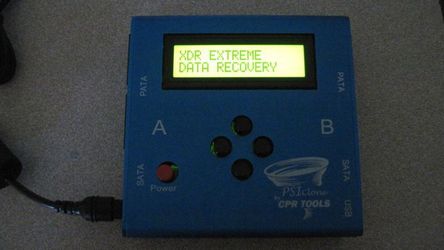
As organizations increasingly rely on complex data infrastructures, the need for proactive firmware management and repair becomes paramount. The integration of sophisticated tools, such as PSIClone and CPR Flash, facilitates precise firmware updates and recovery, ensuring that enterprise storage devices remain reliable and secure. This blog delves into the intricacies of firmware repair, the importance of updating HPE enterprise hard drives, and how Seattle Data Recovery utilizes A+ Rated Accredited BBB Lab technology to protect critical data assets.
Understanding Firmware and Its Critical Role in HPE Enterprise Hard Drives
Firmware serves as the foundational software that controls the hardware of a hard drive. Essentially, it acts as the bridge between physical components and higher-level system operations. In HPE enterprise hard drives, firmware ensures smooth communication, optimal performance, and security, enabling the drives to handle demanding workloads with resilience. Firmware updates or repairs are vital for maintaining the drive's functional integrity over its operational lifespan.
Over time, firmware can become compromised through corruption, bugs, or incompatibilities. These issues can cause performance bottlenecks, hardware malfunctions, and data inaccessibility. Consequently, maintaining the firmware in prime condition is central to preventing hardware failure and protecting enterprise data. Regular firmware updates ensure these drives operate efficiently, reducing downtime and preventing potential cascade failures across data networks.
The Consequences of Firmware Corruption on Enterprise Data and Network Stability
When firmware on an HPE enterprise hard drive becomes corrupted, the consequences extend far beyond the drive itself. The immediate impact includes hardware failure, making the drive inaccessible and risking significant data loss. But the repercussions also ripple through the corporate network, often causing system crashes, degraded performance, and compromised security. In RAID configurations, a single corrupted drive can stall entire rebuild processes, leading to additional drive failures and data loss.
Network performance suffers as system stability decreases. Critical systems may experience slowdowns, crashes, or complete outages. These disruptions directly threaten business operations, resulting in lost revenue, reduced productivity, and increased recovery costs. Recognizing these risks, organizations prioritize timely firmware repair to safeguard their infrastructure—from maintaining data integrity to ensuring continuous network operations.
- Details
- Written by: Seattle Data Recovery
- Category: Hard Drive Repairs
The Critical Role of Firmware in Modern Hard Drives
In the rapidly evolving world of data storage, firmware serves as the essential software that controls the hardware's operations. It acts as the bridge between the physical components and the operating system, enabling seamless data management and drive functionality. Without correctly functioning firmware, a hard drive cannot reliably perform its primary purpose — storing and retrieving data.
Western Digital (WD) drives are widely recognized for their performance, reliability, and durability. However, like all electronic devices, they are susceptible to firmware corruption due to various factors. In such instances, professional firmware repair becomes crucial to restore the drive's health and avoid permanent data loss. Seattle Data Recovery offers specialized expertise in firmware troubleshooting, employing advanced tools such as PSIClone and CPR Flash to address complex firmware issues.
Recognizing the Symptoms of Firmware Corruption
Early detection of firmware corruption in Western Digital drives can significantly simplify the recovery process. Users often notice that their drives are behaving abnormally, which is a clear indicator that firmware issues may be at play. The most common signs include the drive not being detected by the BIOS or operating system, inconsistent capacity or model information, and sluggish performance.
Additionally, users may experience system crashes, blue screen errors, or intermittent drive spinning. Noisy operations, such as clicking or grinding sounds, indicate that the drive heads are struggling to access data, often caused by corrupted firmware that interferes with normal read/write processes. Recognizing these symptoms promptly enables effective intervention before data becomes unrecoverable.
Common Causes of Firmware Corruption in Western Digital Drives
Understanding what causes firmware corruption helps in developing effective strategies to prevent it. Failed firmware updates pose a significant risk, especially if power interruptions occur during the process. Such abrupt interruptions can leave the firmware in a damaged state, rendering the drive unrecognizable or completely inoperable.
Malware targeting firmware areas is another culprit, capable of infecting and modifying essential data stored within the drive's firmware. Hardware failure, physical damage, or bad sectors can also directly or indirectly damage the firmware. Moreover, improper ejection or disconnection of drives can cause data corruption and compromise the firmware, emphasizing the importance of careful handling.
Subcategories
Platters
- What it is: Flat, circular metal or glass discs coated in a magnetic material that physically store all digital data.
- Common failures: Head crashes (where read/write heads scratch or gouge the magnetic surface), bad sectors (unreadable data blocks), and physical warping from severe heat or drops.
Read/Write Heads
- What it is: Tiny sensors mounted on the tip of the actuator arm that float a microscopic distance above the spinning platters to read and write data.
- Common failures: Head crash (contact with platters), head stiction (heads getting permanently glued or stuck to the platter surface), and actuator/head degradation causing clicking or beeping noises.
Actuator Arm & Voice Coil Actuator
- What it is: A mechanical arm that sweeps the read/write heads rapidly and precisely across the surface of the platters, controlled by a magnet and coil assembly.
- Common failures: Failed actuator motor/assembly, mechanical binding, or inability to track and position the heads accurately.
Spindle Motor
- What it is: The motor located beneath the platters that spins them at high speeds (typically 5,400 to 7,200 RPM).
- Common failures: Seized motor (failure to spin up, often making a faint ticking, beeping, or humming sound) or worn bearings that cause grinding noises and wobbling platters.
Printed Circuit Board (PCB / Controller Board)
- What it is: The external green or black circuit board attached to the bottom of the drive that translates signals, controls the motor, and manages data flow.
- Common failures: Electrical short circuits or component burn-out caused by power surges, static discharge, or a faulty power supply, which can render the drive completely dead ("no power/no spin").
Firmware (System Area)
- What it is: Low-level internal software stored on a reserved portion of the platters and PCB that boots the drive and tells the heads how to operate.
- Common failures: Firmware corruption from bugs, improper updates, or unexpected power loss, which causes the drive to spin up but fail to be recognized by the computer.
Cache Memory (DRAM)
- What it is: A small, high-speed volatile memory chip on the PCB that temporarily holds frequently accessed data.
- Common failures: Data corruption or chip failure due to voltage spikes or overheating.
Air/Breather Filter
- What it is: A tiny internal filter that equalizes internal air pressure with the outside while trapping microscopic dust particles.
- Common failures: Clogging or seal failure that lets dust and moisture inside, leading to platter contamination and corrosion.
Data and Power Connectors
- What it is: The physical pins/ports that plug the drive into the computer's motherboard and power supply.
- Common failures: Bent or broken pins, loose cable connections, or corroded contact pads.








